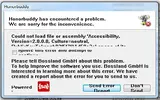
H HB6957X64 New Member Joined May 6, 2011 Messages 36 Reaction score 0 Aug 14, 2011 #1 i keep getting this when i try to login please help please look at the attachment Attachments error.webp 19 KB · Views: 61
Tony "The Bee" Joined Jan 15, 2010 Messages 128,827 Reaction score 570 Aug 14, 2011 #2 on what OS are you?
Tony "The Bee" Joined Jan 15, 2010 Messages 128,827 Reaction score 570 Aug 14, 2011 #4 it seems that something is broken on your netframework or your net framework is disabled go at control panel---programs---windows features on and off and check if its enabled
it seems that something is broken on your netframework or your net framework is disabled go at control panel---programs---windows features on and off and check if its enabled
H HB6957X64 New Member Joined May 6, 2011 Messages 36 Reaction score 0 Aug 14, 2011 #5 i have checked and it is enabled do i need to disable it
Tony "The Bee" Joined Jan 15, 2010 Messages 128,827 Reaction score 570 Aug 14, 2011 #6 HB6957X64 said: i have checked and it is enabled do i need to disable it Click to expand... nope its seems that something is broken on your net framework make sure that you have installed all the available windows updates also you can try to install this Download Details - Microsoft Download Center - Microsoft .NET Framework 4 (Web Installer)
HB6957X64 said: i have checked and it is enabled do i need to disable it Click to expand... nope its seems that something is broken on your net framework make sure that you have installed all the available windows updates also you can try to install this Download Details - Microsoft Download Center - Microsoft .NET Framework 4 (Web Installer)
H HB6957X64 New Member Joined May 6, 2011 Messages 36 Reaction score 0 Aug 14, 2011 #7 i have no updates for windows atm did them a couple of days ago installed from link and still the same m8
i have no updates for windows atm did them a couple of days ago installed from link and still the same m8
H HB6957X64 New Member Joined May 6, 2011 Messages 36 Reaction score 0 Aug 14, 2011 #8 does any1 else have any ideas
Tony "The Bee" Joined Jan 15, 2010 Messages 128,827 Reaction score 570 Aug 15, 2011 #9 are you logged as asmin on your machine?
H HB6957X64 New Member Joined May 6, 2011 Messages 36 Reaction score 0 Aug 15, 2011 #10 Tony said: are you logged as asmin on your machine? Click to expand... yh its the only account on my pc
Tony said: are you logged as asmin on your machine? Click to expand... yh its the only account on my pc
B Beringtom Member Joined Mar 7, 2010 Messages 278 Reaction score 0 Aug 15, 2011 #11 running 64bit or 32bit?
K Kickazz006 Well-Known Member Joined Jan 15, 2010 Messages 20,571 Reaction score 302 Aug 15, 2011 #12 install all windows updates make sure you're running .net 3.5 sp1 - that's your issue (sometimes it's turned off in the windows features area)
install all windows updates make sure you're running .net 3.5 sp1 - that's your issue (sometimes it's turned off in the windows features area)
Tony "The Bee" Joined Jan 15, 2010 Messages 128,827 Reaction score 570 Aug 15, 2011 #13 Kickazz006 said: install all windows updates make sure you're running .net 3.5 sp1 - that's your issue (sometimes it's turned off in the windows features area) Click to expand... we have checked that its enabled probably its corrupted somehow im afraid that you have to format your hdd with ta new installation of windows btw try to install this one Download Details - Microsoft Download Center - .NET Framework 3.5 Service pack 1
Kickazz006 said: install all windows updates make sure you're running .net 3.5 sp1 - that's your issue (sometimes it's turned off in the windows features area) Click to expand... we have checked that its enabled probably its corrupted somehow im afraid that you have to format your hdd with ta new installation of windows btw try to install this one Download Details - Microsoft Download Center - .NET Framework 3.5 Service pack 1