






I am a new botter, just bought an single unlimited license. I need help getting DB up and running.
I have tried both ZIP and Installer version of DB. No luck.
DB reminded me to install .NET and I did that.
What am I missing? Please help
Thanks for the support in advance.

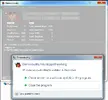
Problem details
Problem signature:
Problem Event Name: CLR20r3
Problem Signature 01: Demonbuddy.exe
Problem Signature 02: 1.1.2881.442
Problem Signature 03: 569868f0
Problem Signature 04: Demonbuddy
Problem Signature 05: 1.1.2881.442
Problem Signature 06: 569868f0
Problem Signature 07: 270
Problem Signature 08: 270
Problem Signature 09: System.IO.FileNotFoundException
OS Version: 6.1.7601.2.1.0.768.3
Locale ID: 3081
Additional Information 1: 0a9e
Additional Information 2: 0a9e372d3b4ad19135b953a78882e789
Additional Information 3: 0a9e
Additional Information 4: 0a9e372d3b4ad19135b953a78882e789
Read our privacy statement online:
http://go.microsoft.com/fwlink/?linkid=104288&clcid=0x0409
If the online privacy statement is not available, please read our privacy statement offline:
C:\Windows\system32\en-US\erofflps.txt
I have tried both ZIP and Installer version of DB. No luck.
DB reminded me to install .NET and I did that.
What am I missing? Please help
Thanks for the support in advance.
Problem details
Problem signature:
Problem Event Name: CLR20r3
Problem Signature 01: Demonbuddy.exe
Problem Signature 02: 1.1.2881.442
Problem Signature 03: 569868f0
Problem Signature 04: Demonbuddy
Problem Signature 05: 1.1.2881.442
Problem Signature 06: 569868f0
Problem Signature 07: 270
Problem Signature 08: 270
Problem Signature 09: System.IO.FileNotFoundException
OS Version: 6.1.7601.2.1.0.768.3
Locale ID: 3081
Additional Information 1: 0a9e
Additional Information 2: 0a9e372d3b4ad19135b953a78882e789
Additional Information 3: 0a9e
Additional Information 4: 0a9e372d3b4ad19135b953a78882e789
Read our privacy statement online:
http://go.microsoft.com/fwlink/?linkid=104288&clcid=0x0409
If the online privacy statement is not available, please read our privacy statement offline:
C:\Windows\system32\en-US\erofflps.txt
