What's new
  • Visit Rebornbuddy
  • Visit Resources
  • Visit API Documentation
  • Visit Downloads
  • Visit Portal
  • Visit Panda Profiles
  • Visit LLamamMagic

Bot only Loads BG and Archeology (No Questing Bot)

JBrandl1

New Member
Joined
May 19, 2014
Messages
2
Reaction score
0
Hello!

I bought the trial version, so I haven't made a huge investment, but it would be pretty cool if this worked out anyway.

I installed: Honorbuddy Installer v2.5.10595.733.

I launch Honorbuddy, which opens the WOW client.
I open the character I want to play, enter my Key, and everything seems to work out.
However, I only have the BG Buddy and Archeology menu items.

Is there a reason this is the case except that the following aren't installed:
.NET Framework and the Microsoft Visual C++ Redistruble?

I attached my Log and hope someone can help.

Thank you,
Jakob
 

Attachments

Hello,

Clearly I am doing something wrong. I tried installing .NET Framework and the Microsoft Visual C++ Redistruble (using the link you provided), and I still have the same problem.
I also installed everything using the new installer (which does all of that automatically), but I can't seem to fix the issue.

I posted my log file. Is there anything else I might be doing wrong?
 

Attachments

  • 4712 2014-05-20 21.04.txt
    4712 2014-05-20 21.04.txt
    30.4 KB · Views: 63
  • Screen Shot 2014-05-20 at 21.05.41.webp
    Screen Shot 2014-05-20 at 21.05.41.webp
    38.8 KB · Views: 77
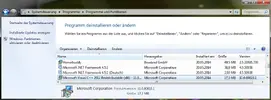
Go to Programs and Features, in your windows Control panel.
Look for:
- microsoft .net framework 4 client profile
- microsoft .net framework 4 extended
- microsoft .net framework 4.5.1
- microsoft visual c++ 2010 x86 redistributable
- microsoft visual c++ 2012 x86 redistributable

and Uninstall them if they are installed.
Restart your PC.

install this
http://www.thebuddyforum.com/demonb...installation-errors-try-demonbuddywizard.html

and this
Download Microsoft .NET Framework 4.5.1 (Web Installer) for Windows Vista SP2, Windows 7 SP1, Windows 8, Windows Server 2008 SP2 Windows Server 2008 R2 SP1 and Windows Server 2012 from Official Microsoft Download Center

run both as administrator.
after the wizard is done, run windows update. And install all updates for .net & c++
Then do one last restart.
 
Back
Top